Tenants - Charges
To edit an existing charge, drill down on the pencil to the left of the building name on the line of the charge that you wish to edit. To add a new charge, click on the Add Charges button.
Use the 'Charges' tab to view or add lease charges that will post during the Begin Month Charge Rent process.
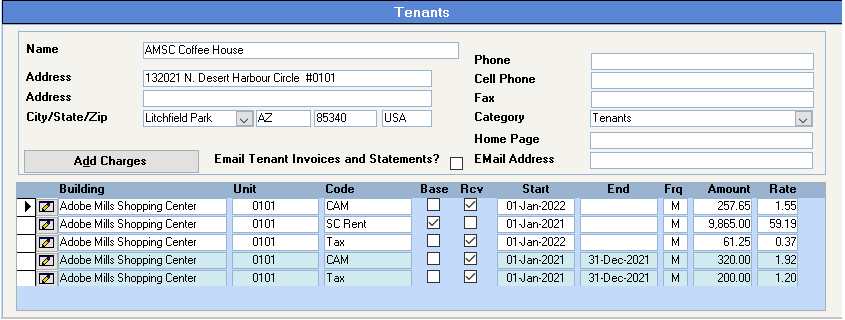
Click Add Charges to add new charges.
To view details for existing charges, click the 'pencil' icon to drill down.
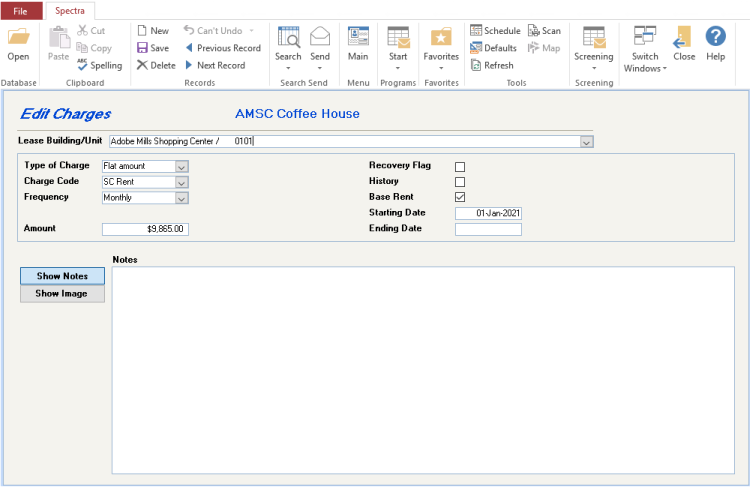
Lease Building / Unit
Select the building and unit for this charge. If the tenant only has one unit, the system will automatically insert the building and unit. If the tenant has multiple units, the system will insert the first one and you must click on the dropdown button to select a different unit number.
Type of Charge
Use the drop down to select.
Flat Amount (Default)- Enter actual dollar amount to be charged, e.g. $500.00
Memo Only - The system will not charge this Memo Only charge. Enter an amount to be recorded that the tenant is paying directly. E.g. In a large multi-use complex, a large anchor tenant may pay its own property tax bill, whereas the other tenants are charged by the landlord at the rate of $2.50/sq.ft. per month. If the rent roll doesn’t show the anchor tenant’s property tax charge, it would give an incomplete picture of the complex. A Memo Only charge will complete the rent roll, but will not actually be charged to the tenant.
Monthly Rate - The system will take this “monthly” rate and multiply it by the tenant’s area to arrive at the dollars/month to be charged by the system. E.g. A Monthly Rate of $1.75 and an area of 950 sq.ft. would yield a monthly rent charge of $1,662.50.
Annual Rate - The system will take this “annual” rate and multiply it by the tenant’s area and divide by 12 months to arrive at the dollars/month to be charged by the system. E.g. An Annual Monthly Rate of $17.50 and an area of 950 sq.ft. would yield a monthly rent charge of $1,385.42.
Charge Code
Select a pre-existing Regular Charge code or double click in the field to bring up the Regular Charge code screen to add a new one. If you have any questions about setting up a Regular Charge code, please refer to the Regular Charge help file.
Frequency
How often do you want the tenant to be charged? The options are Weekly, Monthly, Quarterly, Semi-Annually, Annually. The system will use the starting date of the charge to determine when each of these options will be charged. E.g. If you want a semi-annual charge to be charged April 1st and October 1st, the starting date of the charge should be either April 1 or October 1.
Amount
Enter the full amount if you have selected Flat Amount or Memo Only or the rate if you have selected Monthly or Annual Rate.
Recovery Flag
Select this flag if you have licensed the fully integrated accounting package including Commercial Cost Recoveries Module functionality and if this charge is a budget billing for one of the recoveries.
History
Do not select this field for current or future charges. If you are setting up historical charges and this charge has ended, select this box. Otherwise, the system will flag any charges as History when they have ended.
Base Rent
Certain reports will report on Base Rent charges. They will look here for charges that are flagged as “Base Rent” to find charges that should be included in these reports.
Starting Date
Enter the starting date for the charge. Only charges in effect when the Begin Month program is run will be charged by the Begin Month program. The program will not backbill charges. i.e. If you are setting up the tenant’s charges on May 10th after the tenant moved in on May 1st and you have already run May’s Begin Month, you must manually charge May’s rent using the Charges – Tenant Charges program. When you next run the Begin Month program, the system will charge June’s rent, not May and June’s rent.
Also, if you are using the option on the Leases screen “Begin Month Date = Day of Charge Start Date”, all tenant charges must be set up for the same day of the month.
Ending Date
Leave this date blank unless you have a series of rent increases. In that case, put an ending date on the earlier charges, so that the system will stop charging the earlier ones.

We recommend leaving an ending date off the last charge in case the tenant either renews his lease or doesn’t move out when expected. If the Ending date is left off, the system will carry on charging rent until the Move Out date is entered. If the Ending date is entered, the system will stop charging rent on that date.
Tenant Moving in Mid-Month: *
To handle the adjustments manually, go to the Tenant – Start a Task – Charges – Tenant Charges to enter either a rent reduction (If the full month of rent has already been charged) or charge the pro-rated amount for the month.
If the unit was previously vacant and you record vacant rent, you must make a journal entry to adjust the Potential Rent and the Vacant Rent for the vacant portion of the month.
To obtain a listing of tenants with future move in or move out dates, go to Tenant – Select a Report - Tenants – Tenant Ingoing/Outgoing Confirmation and enter a future date range.
You may wish to edit the charges for any tenants with mid-month move in or move out dates.
Tenant moving in May 10th and May’s Begin Month has been run:
• If the tenant was not set up when you ran May’s Begin Month and the tenant has not been charged May’s rent, manually calculate the prorated rent from May 10th to 31st of $532.26 and charge the tenant through the Charges – Tenant Charges program for this May rent.
• If the tenant was set up when you ran May’s Begin Month and the tenant has been charged the full month’s rent for May, you must credit the tenant through the Charges – Tenant Charges program for the difference.